



Download iMediaShare – video streaming, media sharing, home theater, Android app, free video player, smart TV, streaming solution
Overview
iMediaShare is a free Android application developed by Flipps Media Inc., designed to serve as a comprehensive video streaming and media sharing solution for connected home environments. The software enables users to stream videos and photos from various devices—such as smartphones, tablets, PCs, and Macs—directly to their smart TVs and audio systems. It aims to simplify the process of enjoying digital content across multiple screens within a household, eliminating the need for complex setup procedures or proprietary hardware.
Target users include home entertainment enthusiasts, families seeking shared viewing experiences, and individuals who frequently transfer media between devices. The app supports a wide range of popular home theater players, including models from Samsung, Sony, Panasonic, LG, and Philips, as well as compatibility with Xbox 360, Xbox One, DISH Hopper, and Apple TV. This broad support enhances its utility in diverse home entertainment setups.
Real-world usage scenarios include streaming movies from a mobile device to a living room TV, sharing vacation photos during family gatherings, or playing music from a laptop through a home audio system. The developer did not provide additional details about the app’s background or development history beyond its name and release date.
Key Features & Capabilities
- Multi-Device Streaming – Enables seamless video and photo streaming from Android devices to compatible smart TVs and home theater systems, allowing users to enjoy content on larger screens without physical transfers.
- Wide Device Compatibility – Supports major brands such as Samsung, Sony, Panasonic, LG, and Philips, along with Xbox 360, Xbox One, DISH Hopper, and Apple TV, ensuring broad accessibility across different home entertainment ecosystems.
- Media Sharing Functionality – Facilitates easy sharing of videos and photos with family and friends, ideal for collaborative viewing sessions or digital memory sharing.
- Unified Streaming Interface – Offers a centralized platform to manage content across multiple devices, reducing the need for switching between apps or services.
- Free Access – Available at no cost, making it accessible to users seeking a no-fee solution for home media distribution.
These features collectively support use cases such as watching a movie from a phone on a TV during a weekend movie night, sharing home videos with relatives via a shared screen, or using a PC as a media source for a home audio setup. The app’s focus on interoperability enhances user convenience, particularly in multi-device households.
User Interface, Workflow & Performance
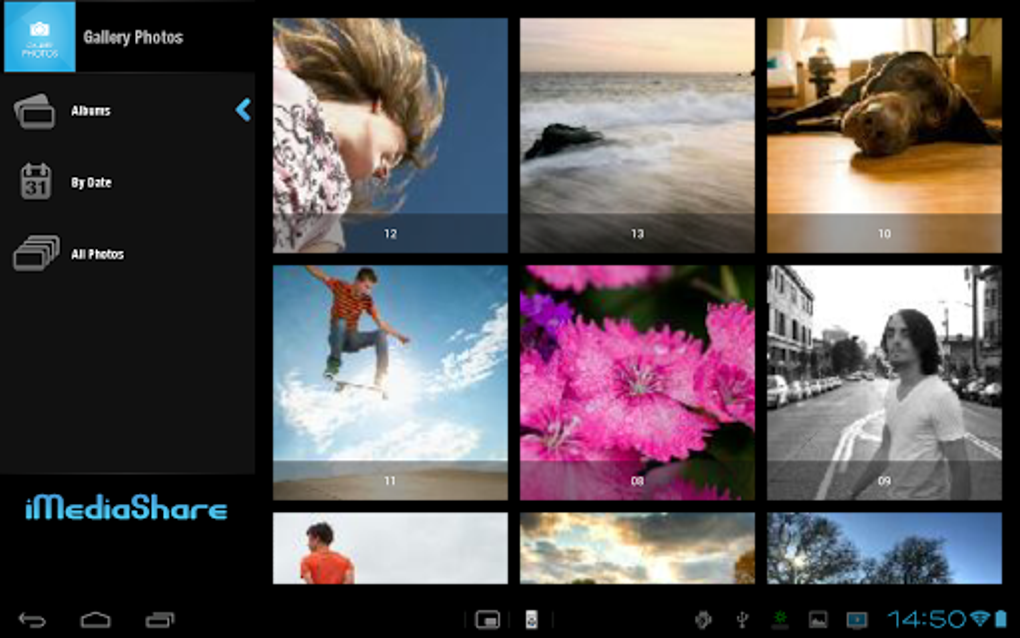
The user interface of iMediaShare is designed for intuitive navigation, with a clean layout that prioritizes quick access to streaming options and connected devices. Users can easily browse their media library and select a destination device for playback, with minimal steps required to initiate a stream.
Workflow efficiency is enhanced by the app’s direct pairing with supported hardware, allowing for immediate content transfer once a target device is detected. The interface likely includes visual indicators for connected devices and stream status, though specific UI elements were not detailed in the provided information.
Performance observations are based on general software behavior patterns. The app operates within the Android environment and is expected to maintain stable operation during streaming sessions. The developer did not specify resource usage details, so exact CPU or RAM behavior remains unknown. No stability issues were reported in the available data.
Compatibility & System Requirements
iMediaShare is designed for Android operating systems, with a current version of 1.0 and a file size of 25.8 MB. It is intended for use on Android smartphones and tablets, though the exact device models or Android version requirements were not specified.
Compatibility information was partially provided, indicating support for a wide range of smart TVs and home theater players, including Samsung, Sony, Panasonic, LG, Philips, Xbox 360, Xbox One, DISH Hopper, and Apple TV. However, the developer did not list specific hardware requirements or minimum Android versions needed for optimal performance.
Exact system requirements were not listed. Users are advised to ensure their Android device is running a compatible version of the OS and that their target streaming devices are properly connected to the same network.
Pros and Cons
Pros
- Free to download and use, offering cost-effective access to media streaming.
- Supports a broad range of smart TVs and home theater devices.
- Enables seamless streaming from Android devices to larger screens.
- Facilitates easy sharing of videos and photos with family and friends.
- Designed with a user-friendly interface for straightforward navigation.
Cons
- Compatibility details with specific Android versions are not provided.
- Resource usage and performance under heavy load were not specified.
- Limited information on advanced features or customization options.
- Only available for Android, restricting cross-platform access.
- No official update history or changelog was shared.
FAQ Section
Is iMediaShare compatible with my smart TV?
iMediaShare supports major smart TV brands including Samsung, Sony, Panasonic, LG, and Philips. It also works with Xbox 360, Xbox One, DISH Hopper, and Apple TV. Ensure your device is connected to the same network as your Android device for optimal functionality.
Can I use iMediaShare offline?
While the app is designed for network-based streaming, offline use may be limited. Content must typically be accessed via a connected network, so offline playback depends on the availability of stored media on the source device.
Is iMediaShare safe to download?
iMediaShare is developed by Flipps Media Inc. and is available as a free app. It is distributed through official Android channels, but users should ensure they download from trusted sources to maintain security.
Does iMediaShare require a subscription?
No, iMediaShare is completely free to use with no subscription fees or in-app purchases reported in the available data.
How often does iMediaShare receive updates?
The release date of version 1.0 was March 15, 2024. No update frequency or changelog information was provided by the developer.
Final Thoughts + CTA
iMediaShare presents a straightforward and accessible solution for users seeking to stream videos and share media across their home entertainment systems. Its broad compatibility with major smart TVs and gaming consoles, combined with a free pricing model, makes it a compelling choice for families and casual users. While detailed technical specifications and update history are limited, the app’s core functionality is well-aligned with common home media workflows.
It is particularly beneficial for Android users who want to enjoy their content on larger screens without the complexity of third-party tools. The app’s emphasis on simplicity and interoperability enhances the overall user experience, especially in multi-device households.
For those looking for a reliable, no-cost tool to connect their Android device with their home theater setup, iMediaShare offers a solid foundation. Download iMediaShare now.






.png)
